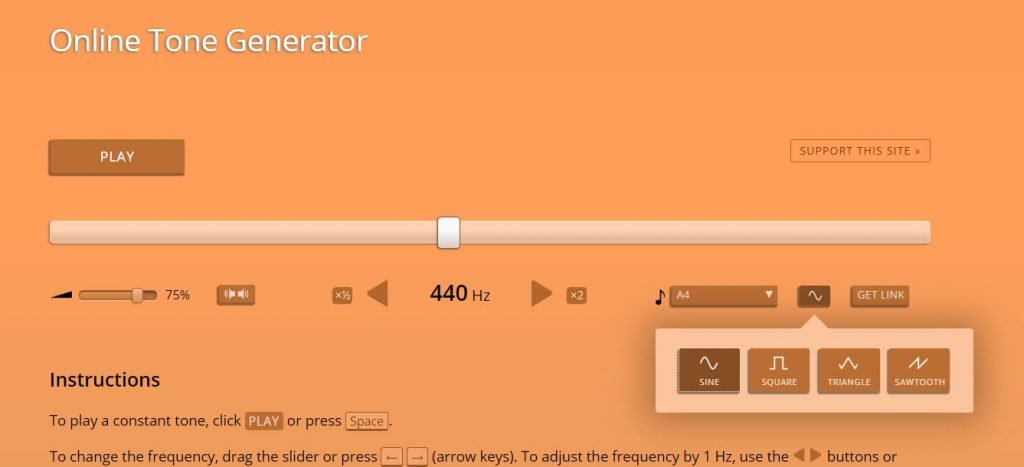
You know that feeling when you're trying to tune an instrument, check your headphones, or even just curious about the secret language of sound? That's where knowing how to use an online tone generator effectively comes into play. It's a surprisingly powerful, yet often overlooked, tool that can demystify everything from speaker performance to the nuances of hearing. Forget complex software; these web-based utilities put a precise audio workshop right in your browser.
This isn't about being a sound engineer (unless you want to be!). It's about empowering you to understand and manipulate sound for practical, everyday audio needs, from troubleshooting a tinny speaker to a simple personal hearing check.
At a Glance: Key Takeaways
- What it is: A free, web-based tool that generates audio tones of specific frequencies and waveforms.
- Why use it: For hearing checks, managing tinnitus, calibrating instruments, testing audio equipment (speakers, headphones), and educational purposes.
- Core functions: Adjust frequency (Hz, kHz), select waveform (sine, square, triangle, sawtooth), control volume, and play.
- Key waveforms:
- Sine: Pure, smooth tone (best for hearing, calibration).
- Square: Buzzing, rich harmonics (good for equipment response).
- Triangle: Softer, flute-like (musical applications).
- Sawtooth: Bright, buzzy, rich harmonics (music synthesis).
- Pro tip: Use quality headphones or speakers for the most accurate results, and remember it's not a substitute for professional medical or audio testing.
Understanding the Invisible: What Exactly is an Online Tone Generator?
Imagine a digital synthesizer stripped down to its core, accessible via any web browser without needing to download a single file. That's essentially what an online tone generator is. It’s a specialized web application designed to produce audio tones—pure, consistent sounds—at specific frequencies and waveforms. Think of it as a virtual tuning fork, but infinitely more versatile, allowing you to dial in exact sonic characteristics.
These tools operate on the principle of generating sound waves digitally and playing them back through your device's audio output. Their magic lies in their accessibility and precision: you can specify a frequency down to a single hertz (Hz) and choose the very shape of the sound wave itself, all with a few clicks or taps. This immediate, interactive control opens up a world of possibilities for anyone working with or simply curious about audio.
The Science of Sound You Can Use: Frequencies and Waveforms Explained
Before we dive into how to use a tone generator, let's quickly unpack the two fundamental building blocks you'll be manipulating: frequency and waveform. Don't worry, this isn't a physics lecture; it's practical knowledge that makes your tone generator truly useful.
Frequency: The Pitch of Your Sound
Frequency dictates the pitch of a sound. It's measured in Hertz (Hz) or kilohertz (kHz, which is 1,000 Hz). In simple terms:
- Low Frequencies (e.g., 20-200 Hz): These are the deep rumbles you feel in your chest. Think bass drums, subwoofers, or the low notes on a piano.
- Mid-Range Frequencies (e.g., 200 Hz - 4 kHz): This is where most human speech and musical instruments reside. It's the "body" of sound.
- High Frequencies (e.g., 4 kHz - 20 kHz): These are the sharp, bright, or even piercing sounds. Think cymbals, bird chirps, or the upper registers of a violin.
The audible range for most humans is roughly 20 Hz to 20,000 Hz (20 kHz), though this range typically narrows with age, especially at the higher end.
Waveforms: The Character of Your Tone
While frequency determines pitch, the waveform determines the timbre or "character" of the sound. Different waveforms produce distinct sounds, even at the same frequency. Online tone generators typically offer a selection of these fundamental shapes:
- Sine Wave:
- What it is: The purest, simplest sound wave imaginable. It looks like a smooth, undulating curve.
- How it sounds: Clean, soft, flute-like, with no harmonic overtones. Think of an old telephone dial tone or a pure whistle.
- Best for: Hearing tests, precisely calibrating audio equipment, isolating a specific frequency without interference from harmonics.
- Square Wave:
- What it is: A waveform that abruptly switches between its maximum and minimum amplitude, creating sharp "corners."
- How it sounds: A bright, hollow, buzzing sound with a rich odd-harmonic content. Think of a retro video game sound or a clarinet in its lower register.
- Best for: Testing audio equipment response (especially transient response), digital synthesis, checking for distortion in amplifiers.
- Triangle Wave:
- What it is: A linear wave that ramps up and down smoothly, forming a sharp peak and valley, but without the abruptness of a square wave.
- How it sounds: Softer than a square wave, yet still brighter than a sine wave. It has a more mellow, flute-like quality, often described as "warm."
- Best for: Musical applications where a softer harmonic content is desired, synthesis of woodwind or brass instruments.
- Sawtooth Wave:
- What it is: A waveform that ramps up linearly and then immediately drops back down to its starting point, creating a saw-tooth pattern.
- How it sounds: Very bright, buzzy, and "full" due to its rich harmonic series (both even and odd harmonics). Often described as brassy.
- Best for: Music synthesis (especially for brass sounds, strings, and pads), testing the full frequency response of speakers due to its harmonic richness.
Understanding these basic waveforms is your first step to truly effective use. Each one offers a unique sonic fingerprint that can serve different diagnostic and creative purposes.
Your Browser as a Sound Lab: How to Operate an Online Tone Generator
Using an online tone generator is surprisingly intuitive, often requiring just a few clicks. While interfaces can vary slightly, the core controls remain consistent across most popular tools like Szynalski or WavTones.
Step-by-Step Operation:
- Open Your Generator: Navigate to your preferred online tone generator in your web browser. You can [Explore our tone generator online] to get started right away. Most are compatible with Chrome, Safari, Edge, and other modern browsers.
- Select Your Waveform: Look for a drop-down menu or a set of buttons labeled "Waveform," "Type," or "Shape." This is where you'll choose between Sine, Square, Triangle, or Sawtooth. Start with a Sine wave for most initial tests as it's the purest.
- Set Your Frequency: You'll typically see a slider or an input box where you can adjust the frequency in Hertz (Hz) or kilohertz (kHz).
- For hearing tests: You'll want to sweep through a wide range, perhaps starting low (e.g., 20 Hz) and moving up to high (e.g., 20,000 Hz).
- For instrument tuning: You'll dial in specific notes (e.g., 440 Hz for A4).
- For speaker testing: You might test extreme low frequencies (e.g., 30 Hz for subwoofers) or specific ranges.
- Adjust Volume/Amplitude: Crucially, always start with a low volume setting on both the generator and your device. Gradually increase it to a comfortable, safe listening level. Many generators have an amplitude or volume slider. Remember, prolonged exposure to loud tones, especially high frequencies, can be harmful.
- Press Play: Once your settings are chosen, hit the "Play" or "Generate" button. You should immediately hear the tone.
- Experiment and Observe:
- Change frequency: Notice how the pitch changes.
- Change waveform: Listen to how the character of the sound transforms.
- Use your ears (and eyes): Pay attention to what you hear. Is it pure? Distorted? Does your speaker rattle at a certain frequency?
Advanced Controls (If Available):
Some generators offer additional functionalities that enhance their utility:
- Tone Panner: Allows you to shift the sound between your left and right speakers/headphones, useful for stereo imaging tests.
- Duration: Set how long the tone plays.
- Download as WAV: This is incredibly useful for creating test files you can use offline or embed in other projects. It ensures high-quality audio output as WAV files are uncompressed.
- Multiple Generators/Mixing: While one generator plays, you can open another tab with a separate generator to mix different tones, creating harmonics or more complex soundscapes. This is a great way to understand how different frequencies interact.
- Adjustable Sample Rates: Higher sample rates (e.g., 48 kHz, 96 kHz) provide higher fidelity audio, particularly important for critical listening or high-frequency tests.
The beauty of these tools is their real-time generation capability. You don't wait for processing; changes are instant, making experimentation fluid and engaging.
Unlocking Its Potential: Practical Applications for Your Audio Needs
Now that you know how to use one, let's explore the practical scenarios where an online tone generator truly shines.
1. Personal Hearing Checks (Not a Medical Diagnosis!)
One of the most common and intriguing uses is for a quick, informal check of your hearing range.
- How to do it: Use a sine wave. Start at a low frequency (e.g., 20 Hz) and gradually increase the frequency while keeping the volume constant and comfortable. Make a note of the lowest and highest frequencies you can clearly hear. Then, repeat, sweeping from high to low.
- What to look for: A healthy young adult typically hears between 20 Hz and 20 kHz. As you age, the upper limit tends to decrease. If you notice a significant difference between your ears or struggle with frequencies that others your age can hear, it might indicate a need for a professional medical hearing test.
- Important Caveat: This is purely for personal curiosity and awareness. An online tone generator is not a substitute for a comprehensive audiology exam by a qualified medical professional. If you have concerns about your hearing, consult a doctor.
2. Tinnitus Management
For individuals experiencing tinnitus (a persistent ringing or buzzing in the ears), tone generators can offer a small measure of relief or understanding.
- How it helps: By generating tones at specific frequencies, some individuals can identify a frequency that matches their tinnitus sound. Sometimes, listening to this frequency, or a slightly different one, at a low volume for a short period can provide a temporary masking effect or habituation, making the tinnitus less noticeable.
- What to do: Experiment with sine waves, carefully sweeping through frequencies to find one that resonates with your internal sound. Keep the volume very low and listen for short durations.
- Disclaimer: This is a self-management technique, not a cure. Always discuss tinnitus strategies with your audiologist or ENT specialist.
3. Calibrating Musical Instruments
Musicians, rejoice! A tone generator can be an invaluable aid for tuning instruments, especially those that rely on precise pitch.
- For String Instruments (Guitars, Basses):
- How to use: Dial in the exact frequency for each open string (e.g., low E on a guitar is about 82.41 Hz, A is 110 Hz, D is 146.83 Hz, G is 196.00 Hz, B is 246.94 Hz, high E is 329.63 Hz). Play the tone through your speakers and tune your string by ear until it matches.
- Why it's better than apps: While apps are great, a direct tone can be purer and offer more flexibility for custom tunings or intonation checks along the fretboard.
- For Pianos/Keyboards:
- How to use: You can check the tuning of individual keys by matching their fundamental frequencies.
- Intonation Checks: For advanced users, you can even check the intonation of stringed instruments at various frets by comparing the generated tone with the fretted note.
4. Testing Audio Equipment: Speakers, Headphones, and Subwoofers
This is where a tone generator truly flexes its muscles for audiophiles and casual listeners alike. It helps you assess the performance and identify potential issues with your audio gear.
- Frequency Response Testing (General):
- How to use: Play a sine wave and slowly sweep through the entire audible frequency range (20 Hz to 20 kHz).
- What to listen for: Do certain frequencies sound louder or quieter than others? Are there dead spots where sound disappears? This can reveal uneven frequency response in your speakers or headphones. A good speaker should reproduce all frequencies relatively evenly.
- Subwoofer Testing (Low Frequencies):
- How to use: Generate very low sine waves (e.g., 20 Hz, 30 Hz, 40 Hz, 50 Hz).
- What to look for: Can your subwoofer reproduce these deep frequencies cleanly? Listen for rattles, buzzing, or distortion, which could indicate a poorly sealed enclosure, a damaged driver, or an overdriven signal.
- Speaker & Headphone Channel Check:
- How to use: Use a tone panner (if available) or simply move the sound from left to right.
- What to look for: Confirm that the sound shifts correctly between your left and right channels, ensuring your stereo setup is wired properly.
- Resonance & Vibration Detection:
- How to use: Play a sine wave and sweep through frequencies while observing your speakers or room.
- What to look for: Does anything in your room start to vibrate or rattle at a specific frequency? This can help you identify problem areas that need acoustic treatment or physical dampening. Use a square or sawtooth wave for more aggressive testing as their rich harmonics will highlight distortions.
5. Educational and Experimental Purposes
For students, educators, or anyone simply curious about the physics of sound, a tone generator is a fantastic learning tool.
- Understanding Harmonics: Generate a sine wave (fundamental frequency), then open another generator to add an octave higher (double the frequency) or a perfect fifth (1.5x the frequency) using a sine wave. Listen to how these "harmonics" combine.
- Sound Synthesis Basics: Experiment with combining different waveforms at various frequencies and volumes to understand how basic sounds are built. For instance, combining multiple sine waves can approximate more complex waveforms.
- Science Projects: Explore concepts like resonance, interference, or the inverse square law of sound propagation in a hands-on manner.
Demystifying the Jargon: Tone, Frequency, and Signal Generators Compared
While often used interchangeably in casual conversation, these terms refer to tools with distinct capabilities. Understanding the difference helps you choose the right tool for the job.
- Tone Generator: This is what we've been discussing. Its primary function is to produce audio tones—specific frequencies within the audible spectrum, usually for music, hearing, or general audio testing. They typically focus on common waveforms like sine, square, triangle, and sawtooth.
- Frequency Generator: Broader in scope than a tone generator. A frequency generator can produce a wider range of frequencies, including those outside the audible human hearing range (e.g., ultrasonic or infrasonic frequencies). These are often used in scientific research, medical applications, or testing equipment that operates beyond human hearing. While they can produce audible tones, their domain extends much further.
- Signal Generator: This is the most comprehensive category. A signal generator produces various types of electrical signals, not just audio frequencies. These signals can vary in frequency, waveform, and amplitude, and might include pulses, ramps, arbitrary waveforms, and more. They are primarily used in electronics for testing and troubleshooting electronic circuits, radio equipment, and communication systems. An audio tone generator is a specific type of signal generator, but a signal generator can do much more than just produce sound.
In short: All tone generators are frequency generators (within the audible range), and all frequency generators are signal generators (producing specific electrical signals that might or might not be audible). But not all signal generators are tone generators, and not all frequency generators are primarily for audio. For your audio needs, an online tone generator is precisely what you're looking for.
Common Pitfalls and Pro Tips for Effective Use
To get the most out of your online tone generator and avoid any mishaps, keep these practical tips in mind:
Avoid These Common Mistakes:
- Starting with High Volume: Never, ever start playback with your volume cranked up. High-frequency tones at loud volumes can be uncomfortable, startling, and potentially damaging to your hearing or speakers. Always start low and increase gradually.
- Ignoring Waveform Choice: Using a sine wave when you need rich harmonics (like testing distortion) will yield incomplete results. Conversely, using a sawtooth for a pure hearing test will introduce unnecessary complexity. Match the waveform to your purpose.
- Over-reliance on "Medical" Claims: Repeat after us: an online tone generator is not a medical device. It cannot diagnose hearing loss or cure tinnitus. Use it for personal exploration and awareness, but always consult professionals for health concerns.
- Using Poor Quality Audio Output: If you're testing speakers with cheap, tinny headphones, you won't get accurate results. For critical testing, use the best quality headphones or speakers you have available.
- Confusing Speaker Noise with Test Tones: Sometimes, a speaker might emit static or hum when idle. Ensure the sound you're hearing is actually the generated tone and not ambient noise from your equipment or environment.
Pro Tips for Maximizing Your Experience:
- Choose the Right Waveform for the Job:
- Sine wave: For pure, uncolored sound (hearing tests, instrument tuning, finding specific resonances).
- Square/Sawtooth wave: For harmonic-rich sounds (testing distortion, general speaker response, musical synthesis).
- Triangle wave: For softer, mellower harmonics (musical experimentation).
- Listen in a Quiet Environment: Minimize background noise to accurately perceive the tones, especially at very low or high frequencies, or quiet volumes.
- Take Breaks: Don't listen to continuous tones for extended periods, especially at higher volumes. Give your ears a rest.
- Document Your Findings: If you're performing tests (e.g., on different pairs of headphones), jot down what you observe at various frequencies. This helps you track performance and make informed comparisons.
- Experiment with Combining Tones: As mentioned, open multiple browser tabs with different generators. Play a low sine wave, then add a higher sine wave, or even a square wave, to hear how they interact and create new textures. This is a fundamental concept in sound design.
- Save Your Settings: If your chosen generator allows downloading WAV files, generate and save specific test tones you frequently use (e.g., a 440 Hz tuning note, a 50 Hz bass test).
Your Next Steps in Sound Exploration
Using an online tone generator effectively isn't just about playing a sound; it's about listening, understanding, and interacting with the world of audio in a more informed way. From ensuring your speakers deliver crisp highs and rumbling lows to fine-tuning your musical instruments, this simple web tool puts powerful sonic diagnostics and creative potential at your fingertips.
So, go ahead. Open a new tab, choose a waveform, and start exploring the fascinating frequencies that surround us. Your ears (and your audio equipment) will thank you for it.
Untuk pemahaman lebih lengkap, baca panduan utama kami: Explore our tone generator online